RFC6598 and DMZ: Understanding the Crucial Role in Network Architecture.
I work with many vendors that need to connect physical equipment in a warehouse setting. I also work with vendors who connect non-cloud services (the big three: AWS, Azure, GCP) to one of the big three. I’ll discuss what I’ve learned and designed over the years, with the hope of helping others with some of the headaches you might encounter.
Let’s introduce a new type of DMZ called the ‘Partner’. This is a logical network specifically designed for vendors, partners, and other on-premises devices that we do not want to be part of our corporate network. It’s distinct from the traditional DMZ for corporate servers that may host services accessible to the public.
90% of vendors and partners need the following
- Internet access
- Access to specific systems
- Remote access to equipment (50/50)
The remaining 10% are what we call ‘wild card 1-offs.’ These are unique situations that you can’t always plan for or predict. Dealing with these instances requires flexibility and adaptability.
Practicality in Design: Ensuring Seamless Vendor Integration in the Partner DMZ.
https://datatracker.ietf.org/doc/html/rfc6598
IPv4 /10 address block to be used as Shared Address Space to accommodate the needs of Carrier- Grade NAT (CGN) devices. It is anticipated that Service Providers will use this Shared Address Space to number the interfaces that connect CGN devices to Customer Premises Equipment (CPE).
Many telcos will use this range for modems, cellphones, or direct connections. In this design, we will use it for all our vendors’ and partners’ on-site equipment. This will allow them to run any local network on their equipment as needed, without trampling on any RFC 1918 networks you might have behind your firewall.
Cloud / Partner / Onprem Simple Design
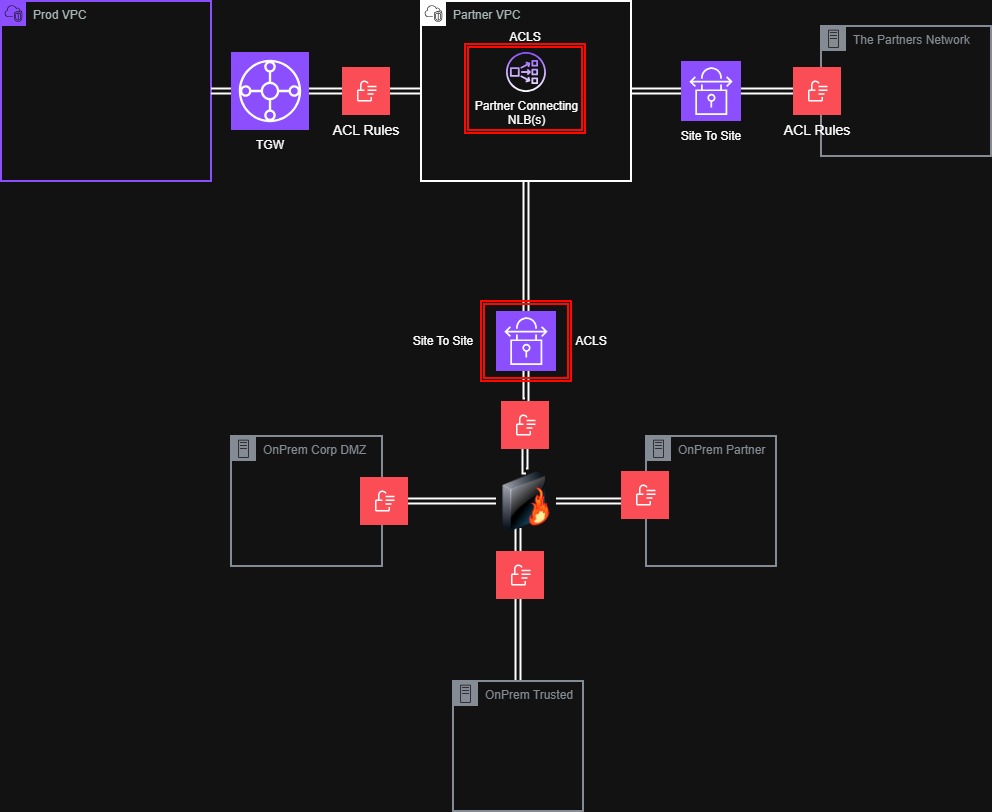
Firewall to trusted network, vpn to cloud, DMZ corp, and DMZ partner.
This design enables the partner to communicate with specific services in our cloud or on-premises. These are locked-down ACLS with accounts limited to what they need access to.
Cloud DMZ Design.
If you apply what we just talked about to the cloud, it looks almost the same, but depending on the cloud, you have different options. I’m only going to use things that each of the big ones will have.
VPCs, Local Balances, Health Checks, ACLs, and Route tables. All of the big 3 have these, and there are plenty of other services in each cloud you can also use. I plan to talk about an AWS-specific design in the future.
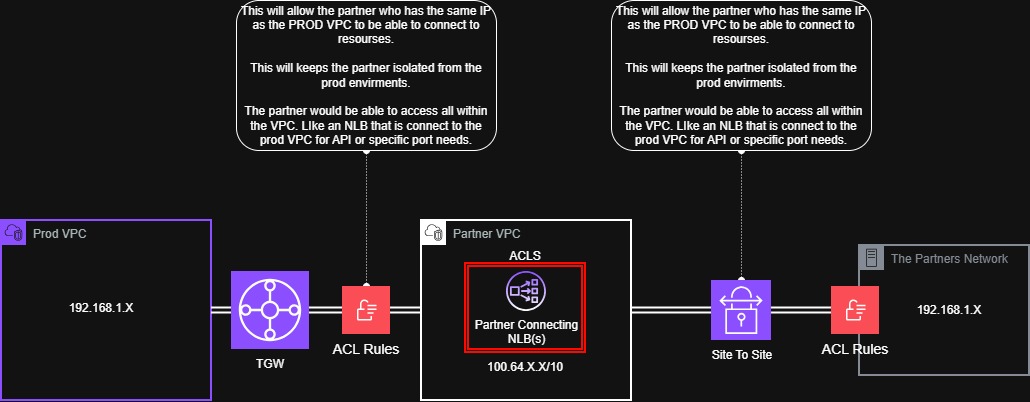
Several VPCs connecting to 1 VPC give a route table with LoadBalancers that make the connection. On the other side is a VPN from the partner, and they have services that connect to a load balancer. Make this like the AAWSPartnerconnection for the session.
In this example, we have a partner providing two services, and we, the customer, are also providing them access to an internal service. Think of the load balancers as the endpoints for all access. This allows us to set ACLs and health checks for monitoring services in that cloud. The Vendor/Partner here only has routes to the 100.64 range and can’t talk to any other VPC.
Empowerment through Control: The Simple Designs that Put You in Charge of the Partner/Vendor Network.
Keeps the network secure Allows for total visibility into each vendor/partner Limit access and use the least privilege Prevent IP trampling of internal networks. Any cloud or on-premises firewall can do this. The goal is to give you an idea and expand on what works best for your company or personal use. This may not work for everyone, but I hope to give someone that light bulb moment to build something that works for them!
Reference
Kuarsingh, V., Weil, J., Donley, C., Liljenstolpe, C., & Azinger, M. (2012). IANA-Reserved IPv4 Prefix for Shared Address Space. https://doi.org/10.17487/rfc6598